
Holden are going all out to promote MyLink for the release of the latest Commodore. It’s true that there have been leaps in technology such as the aluminium bonnet and boot and the electric steering which allows the car to park all by itself, but MyLink will be the thing that assists the driver each and every trip.+
Press Release:
- Full-colour eight-inch touch screen display standard on every VF/ WN model
- Embedded Apps – customised Pandora® Internet Radio and Stitcher Smart Radio™
- Enhanced Voice Recognition – tuned for the Australian accent
- Satellite Navigation with Voice Recognition and Traffic Management (standard on V-Series models and optional on all other models)
- First locally made car with Siri® Eyes-Free Integration
- Enhanced integrated Bluetooth® for hands-free phone and audio streaming (compatible devices)
- Text Messaging to Voice functionality
The Holden VF Commodore will be the only car range in Australia to include a large eight-inch colour touch screen as a standard feature on every model when it goes on sale next month.
The touch screen plays host to Holden’s MyLink system – a hub that enables Commodore drivers to sync their compatible smartphone with their car to access selected internet and phone services as well as control many conventional vehicle functions.
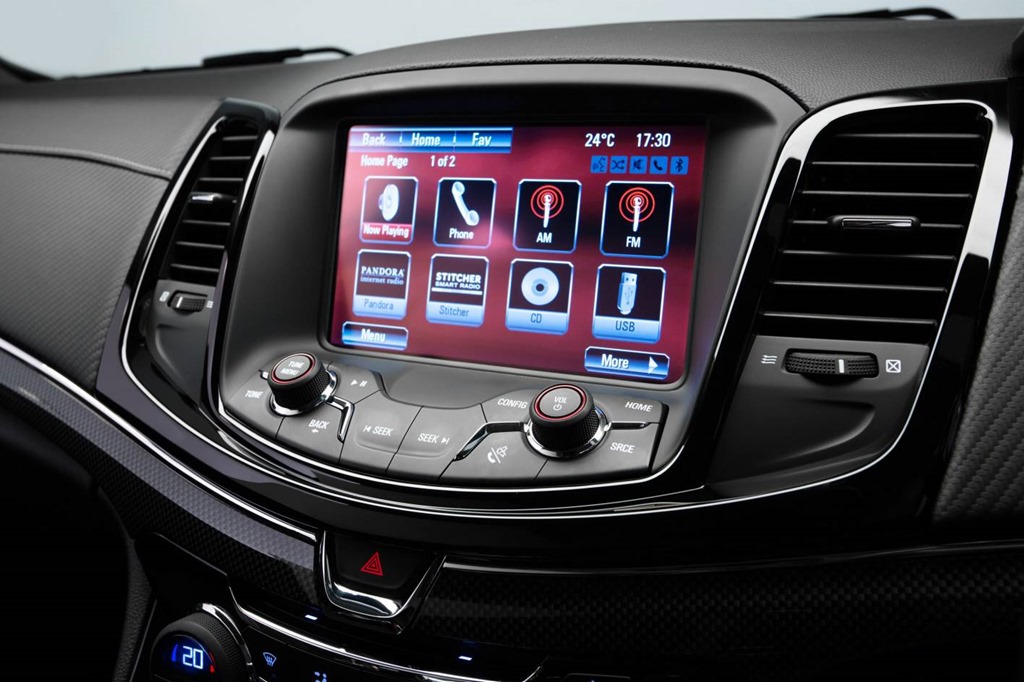
Via the MyLink touch screen, VF Commodore drivers can access vehicle information and entertainment functions including Pandora® Internet Radio and Stitcher SmartRadio™ embedded apps, play music from a variety of sources, including Bluetooth® connected devices, USB, CD player and AM/FM radio, view and control satellite navigation where installed and view vision from the rear view camera.
Holden Director of Electrical Engineering, Jo Markham, said the rapid adoption of smartphones and improved data networks in Australia were enabling the integration of new technology into modern cars.
“Australia has one of the highest levels of smartphone penetration in the world – in fact by the end of the year, over 73 per cent of phones in Australia will be smartphones,” she said.
“Around 85 per cent of smartphone users use their phone while on the go and this means that for drivers, they are increasingly expecting their phone to integrate with their car and vice-versa. It’s an area of rapid change. How can we deliver on drivers’ expectations to keep connected while keeping them focused on the road ahead?”
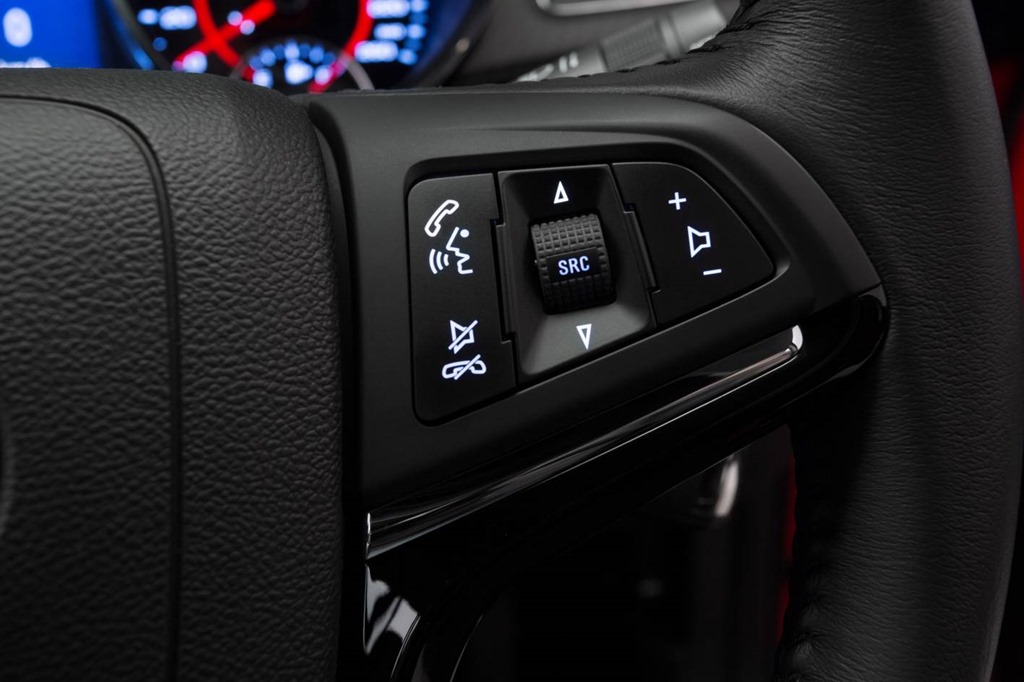
One of the core development areas for Holden has been the integration of voice recognition that enables drivers to instruct MyLink to perform most functions via a push-to-talk button located on the steering wheel.
“It’s about ensuring the drivers eyes remain on the road and their hands remain on the steering wheel,” Jo Markham said.
“Through voice recognition, drivers can set a navigation destination, select a music track, switch between apps, listen to text messages, make a phone call or, via iPhone*, instruct Siri to read a reminder or compose a text – all without the driver taking their hands from the steering wheel.”
“Holden MyLink takes hands-free connectivity to a new level. There’s wider scope for media customisation, including internet radio streaming with our partner apps, Pandora and Stitcher – and this high-feature access is available right across the VF Commodore range,” Jo Markham said.
As part of the core requirement to deliver in car technology solutions simply, quickly and safely, the MyLink interface in VF Commodore has also been developed to offer full flexibility, drivers and passengers can connect via touch screen, faceplate buttons, steering wheel controls, voice control or a combination of these methods with equal ease.
“We know drivers have different preferences on how they choose to access these functions, so we offer them the choice. What is key to the successful integration of these technologies into cars is that the system is simple and intuitive to use.”
MyLink Functions
About the Touch screen
MyLink’s large eight-inch high-resolution, full-colour touch screen is centrally mounted high in the instrument panel.
Designers drew inspiration from the intuitive, easy-to-use interfaces found on popular consumer electronics and programmed the system to minimise the number of steps required to complete a task.
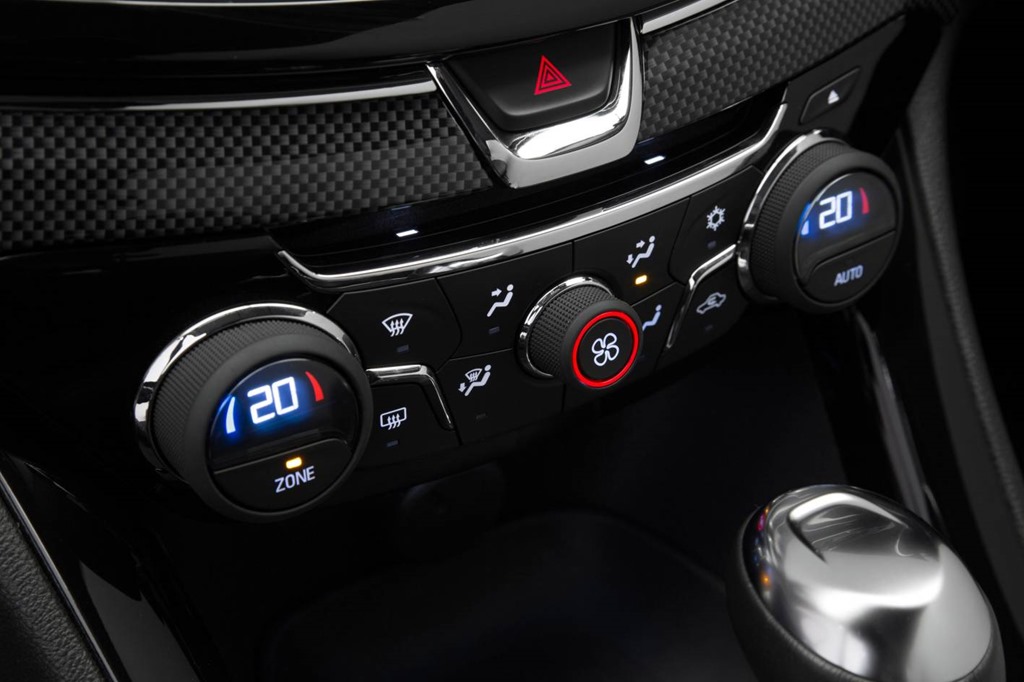
The MyLink home page can be customised with favourite features, and the screen also displays and allows control of functions including the time and date, radio data system (RDS), program station, name and artist information where available, heating ventilation and air-conditioning functions, exterior ambient temperature, radio band selection and frequency, rear camera vision (while in reverse), navigation mapping where fitted and front and rear park assist alerts.
Navigation with live traffic updates (Standard on Calais V-Series, SS V-Series and Caprice V-Series. Optional on all other models)
MyLink features an all-new integrated satellite navigation system which has been designed to be easy to program and easy to read. A high-clarity full colour mapping system offers turn by turn and audio route guidance, live traffic updates, displays speed limits and includes points of interest.
New features include split screen intersection views and a split screen zoom view with moving vehicle indicator that enables simple guidance through complex intersections. Turn by turn instruction are also beamed to the Head-up Display where installed.
The high-feature navigation system features MyLink’s intuitive controls and integrated voice recognition. Drivers can perform all major functions through voice command via the push-to-talk steering wheel button.
The system offers a full suite of traffic management solutions including real-time traffic information and warnings of congestion due to accidents and roadworks which are displayed as traffic icons on the colour map. Navigation can be set to re-route and avoid congested areas.
Other features of the MyLink satellite navigation system include
- Touch screen keyboard to facilitate easy text entry
- Isometric and 3D map views – map appearance can be customised to suit (2D North, 2D Direction or 3D Direction)
- On-screen turn-by-turn and audio route guidance (with an Australian accent)
- Add/Edit and Detour stages allow addition of intermediate stages and detours to a trip
- Simulate Trip feature that replicates a journey in high speed
- Point of Interest – navigate to the nearest service station, restaurant, Holden dealership, hotel and tourist attraction and more
Apps – playing Pandora® and Stitcher SmartRadio™
Just like smartphones and tablets, Holden MyLink operates on an app-based interface.
Top-rating smartphone apps Pandora® and Stitcher SmartRadio™ are both supported for VF Commodore and can be accessed through the Holden MyLink system through voice command, touch screen or steering wheel controls.
These embedded apps give users the ability to create individual radio choices based on favourite artists and musical tastes (Pandora), or generate the content they want from news and talk radio sources (Stitcher).
To use Pandora and Stitcher in VF Commodore, drivers need to also have the apps installed
on a smartphone with data connection, or they can download Stitcher podcasts for offline listening.
Using voice commands, the driver can instruct MyLink to “Tune Pandora” or “Tune Stitcher” and will automatically make a connection between the car and the smartphone.
Just like Pandora’s familiar interface on desktop or app, drivers and passengers can access their radio stations and tune the track list by pressing the “thumbs up” or “thumbs down” button on the MyLink touch screen. They can also bookmark a track or artist to create new stations when they return to their desktop.
To support the launch of Pandora in Holden cars, Pandora has created three custom Holden Driving Stations which include great driving tracks across a variety of genres; Holden
Driving Hits: http://bit.ly/13kDO7e; Holden Family Driving Tracks: http://bit.ly/12bfDIR; and
Holden Classic Driving Tracks: http://bit.ly/VNLCK9.
Enhanced Voice Recognition
Voice recognition in the Holden VF Commodore has been enhanced with a system that has been tuned to the Australian accent. Powered by Nuance,® a leader in voice recognition technology, Holden MyLink delivers high-accuracy speech recognition for Australian drivers that allows the use of simple voice commands to initiate phone calls, select radio stations or play music from a smartphone, iPod®/iPhone® or USB device and internet radio stations Pandora® and Stitcher SmartRadio™.
Voice controls for Bluetooth® phone functions include “dial”, “redial”, “save” and adding a voice tag. Control over certain radio, audio system and navigation functions includes selecting radio stations, audio tracks, navigation destination settings and pre-set destinations.
Some sample commands include: “Call Amanda” … “Play [artist name]” … “Search Folder [name]”.
MyLink’s voice recognition capability also benefits from Commodore’s super-quiet new interiors which effectively block or absorb sound and dampen or eliminate vibrations. Echo cancelling and noise reduction tuning work has also been undertaken to enable better microphone performance by further improving the performance of the system.
Siri Eyes-Free Integration*
Holden VF Commodore will be the first locally produced car to support Siri Eyes Free Integration.
Drivers with a compatible device* running iOS 6 can direct the Siri virtual assistant to perform a number of tasks using voice control. Eyes Free integration keeps their device’s screen from lighting up, ensuring drivers are not tempted to look at their phone screen. Owners simply connect their iPhone to the MyLink radio via Bluetooth, pair the phone with the system, and use the steering wheel voice activation button to begin and end sessions with Siri in Eyes Free mode.
Siri allows drivers to compose and send an iMessage or SMS to a phone number of anyone in saved contacts, access their calendar and add appointments, among other things.
*Siri is available in Beta only on iPhone 4S, iPhone 5, iPad (3rd and 4th generations), iPad mini and iPod touch (5th generation), and requires Internet access. Siri may not be available in all languages or in all areas, and features may vary by area. Mobile data charges will apply.
Voice to Text Messaging
Ensuring drivers remain focused on the road ahead, Holden VF Commodore is the first locally produced Holden to offer text messaging functionality across all models via the touch screen.
When a smartphone is connected to the car via Bluetooth and an SMS is received, an audible signal is heard and a visual alert appears on the MyLink screen offering the driver the opportunity to have the text message read out to them or ignored to read when the driver has stopped the vehicle.
With compatible smartphones, the driver can then use the voice recognition or Siri hands-free integration via the push-to-talk steering wheel button to dictate a response or select a pre-programmed response via the touch screen.
Gracenote® technology
A Gracenote® music database embedded into the MyLink system improves the iPod and USB playback experience by helping users to manage and navigate their music collections.
It identifies music, podcasts, audio books, etc, stored on smartphones or other devices, making it easy to pick and play tracks.
Once a device is connected, MyLink indexes music, sorts it by artist, album and genre, fills in missing song information and associates album cover art with tracks, where possible.
Users can access tracks via voice recognition, touch-screen or faceplate controls.
A More Like This feature automatically creates a playlist of music (up to 30 songs in the playlist) based on the attributes of the song currently playing.
Music Search by Voice: Gracenote® uses the Holden MyLink system’s voice recognition capabilities for music search and navigation, enabling users to pinpoint bands, artists and albums – and instruct the system to play music by using a famous band’s or artist’s name.
To activate voice control, the driver taps the Push to Talk button on the steering wheel and says, for example: “Play Artist [artist name]” or “Play Album [album name]”. MyLink will recognise it on the connected device and play it over the vehicle sound system.
Searches can be made using such voice commands as: Search Artist…; Search Composer…; Search Album…; Search Genre…; Search Folder…; Search Podcast…; followed by the name of the item the driver wants to locate.
Bluetooth® communication
Holden MyLink improves paired mobile phone connectivity via voice recognition technology.
To activate voice control, the driver simply taps the Push to Talk button on the steering wheel and says, for example: “Call (name of contact) at home”. The system will access the phone book, find the number and dial it. To dial by number, the driver presses the Push to Talk button, and says “dial (number)”.
Calls can also be made by navigating contact listings on MyLink’s touch-screen interface, or by using the touch-screen keypad. Calls are taken by pressing the steering wheel control or touch-screen icon.
About Pandora:
Pandora is one of the world’s leading internet radio services, giving people the music they love anytime, anywhere, through connected devices such as smartphones, tablets, laptops and desktop computers. Pandora is also available in selected vehicles in Holden’s 2013 vehicle range which include the Holden MyLink infotainment system.
About Stitcher:
Stitcher is the leader in Internet Radio for the world beyond music. Stitcher delivers the latest news, politics, sports, business and entertainment on-demand to listeners on their mobile phones. The Stitcher app has been downloaded over 8 million times and offers the best programming from thousands of content providers including NPR, Fox and CNN.
Download Pandora for iOS
Download Pandora for Google Play
Download Stitcher for iOS
Download Stitcher for Google Play
Discover more from Gay Car Boys
Subscribe to get the latest posts sent to your email.













Surrounding themselves with positive influences and adhering
to outpatient counseling and programs is a
must. Drug addiction is not really believed to be a
simple habit or lifestyle gone haywire. It is crucial that active addicts seeking help
understand these differences in order to make educated
choices about their treatment.
[…] http://gaycarboys.com/2013/05/31/mylink-tunes-vf-commodore-to-driver-demands/ […]