
The Ultimate 360° Dashcam — For When You Need to Catch Karen Lying
Let’s get one thing straight (but not too straight): the Navman MiVue True 4K PRO Surround isn’t your run-of-the-mill dashcam. This triple-camera setup gives you close to a full 360° view — front, rear, and through the side windows. If Tesla’s full-surround view is out of your budget, Navman’s latest offering is the next best thing without needing to remortgage or sell your organs.
Most dashcams cover front and rear. Navman adds a third lens inside the rear module that faces forward through the side windows. This extra viewpoint fills in many of the blind spots typical of dual-cam setups and helps catch all the madness — especially when Karen in the Kia decides she’s going to cut across three lanes without signalling, then gaslight you about it on Facebook Marketplace.
Crystal Clear Triple-Cam Setup With True 4K Power
The front cam records in glorious True 4K UHD (3840×2160) at 30fps, while the rear cam captures detailed 2.5K QHD (2560×1440) footage. The lenses are wide but well balanced — 140° at the front and 135° at the rear — which avoids that distorted fisheye look while still covering a lot of real estate. Your number plates and faces will be clear enough to make those insurance claims or police reports stick.
Inside the rear camera unit sits the third lens, facing forward through the side windows, catching side traffic, cyclists, and that dodgy Uber driver you swear was using their phone. It even records cabin audio and video, perfect if you need receipts for your rowdy backseat passengers or your own karaoke session gone wrong.
Power and Connectivity: The Basics Done Right
Power is supplied from your vehicle’s 12V socket, with a Mini USB port on the front cam and a USB-C port on the rear. Yes, it’s an odd mix of connectors, but it works. The wiring is neat and discreet, though running the rear cable behind panels is a bit of an installation project.
Mounting is via 3M tape and/or electrostatic sheets, so you can choose permanent stick-on or removable options depending on your style. Just beware the infamous Aussie heat — the 3M tape can get melty in summer if you leave your car roasting in the sun.
Keep an Eye on Your Car Even When You’re Not There
If you want the MiVue to watch your vehicle while parked, you’ll need the optional Smartbox III parking mode kit. This hardwires the system to your car’s battery, allowing it to detect motion or impacts even when the ignition is off.
But heads up: it relies on an auxiliary battery with limited capacity, so it won’t watch forever without recharging on your next drive. Still, it’s perfect for catching hit-and-run parking lot cowboys, vandalism, or that “accidental” keying from your ex.
Special prices on
Motor Cycle:
MiVue Rider DC: https://www.navman.com.au/mivue-rider-dc
MiVue M820D: https://www.navman.com.au/mivue-m820d
Car/SUV:
MiVue True 4K Pro Surround: https://www.navman.com.au/mivue-true-4k-pro-surround
Above: This Week’s VIDEO Review –The 2025 Navman MiVue True 4K PRO Surround is the ultimate dashcam to catch every Karen on the road
#NavmanMiVue, #Dashcam360, #CarTech, #Navman2025, #True4KPROSurround, #CarSafety, #InCarTech, #4KDashcam, #MiVue, #KarenCaughtOnCam #GayCarBoys #alanzurvas,
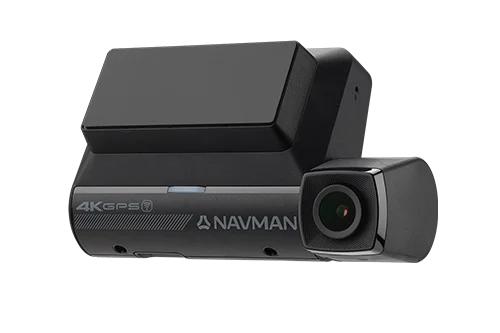

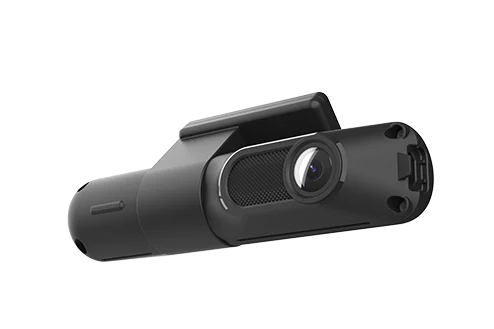


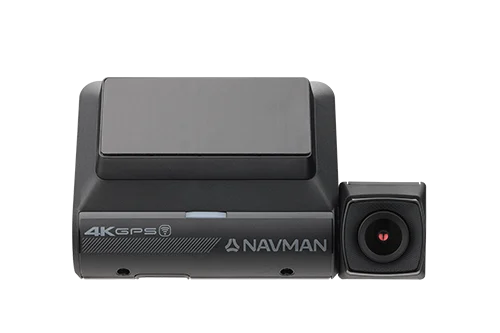


ABOVE: 2025 Navman MiVue True 4K PRO Surround
📶 WiFi and CarPlay: A Bit of a Love-Hate Relationship
A key quirk worth knowing: the MiVue’s WiFi connection can’t run simultaneously with your phone’s Apple CarPlay or Android Auto. So, if you’re cruising with CarPlay hooked up, you won’t be able to connect to the dashcam’s WiFi to download footage or adjust settings until you disconnect.
It’s a small hassle, but worth planning around if you want to review your footage on the fly without unplugging your phone from the dash.
📺 Screen and Controls: Good Idea, But Could Use Some Tweaking
The front unit sports a downward-facing 2.7” LCD screen, with buttons located along the bottom edge. This keeps the design slim and neat, but it’s a bit of a double-edged sword. The angle means the screen isn’t always easy to see, especially if you want to check footage on the fly.
What’s worse: dashboard reflections can completely obliterate the display in bright sunlight, turning your screen into a glare-fest. If you drive at dawn or dusk, it’s less of an issue, but midday freeway cruising? Prepare to squint.
The buttons, while tactile, aren’t labelled clearly and can be tricky to find and press without taking your eyes off the road. We’d recommend setting your preferences via the app beforehand, then just using the screen to check recordings occasionally.
🚨 ADAS and Alerts: Useful, But Don’t Let Them Drive For You
The MiVue Surround includes the usual ADAS features: lane departure warnings, forward collision alerts, and speed sign recognition, and more.
Let’s be honest: these alerts can be a bit naggy, and the speed sign detection isn’t perfect. Sometimes the camera thinks you’re speeding on the next street or in a totally different zone. It’s cute, but we recommend muting the warnings and keeping your eyes on the road yourself.
📱 App and Firmware: Simple, But Effective
The MiVue PRO app connects to the camera via WiFi (using a QR code to pair), letting you access footage, adjust settings, and download videos to your phone.
Monthly firmware updates help keep the system sharp, and the app’s interface is easy enough for anyone who’s ever used a smartphone. Just remember the WiFi connection can be a bit flaky if your phone roams or if the signal drops.
💸 The Price Tag: Premium Protection for Your Peace of Mind
At $529 AUD, the Navman MiVue True 4K PRO Surround isn’t cheap. But you’re paying for near-complete 360° coverage, clear and reliable footage, and smart safety features designed with Aussie roads in mind.
If you want a dashcam that’s discreet, tough, and detailed enough to catch Karen lying through her teeth, it’s worth every cent.
👏 What We Loved
- Brilliant triple-camera coverage with near-360° views
- Sharp, detailed footage day and night
- Inside cabin recording adds extra security
- Easy app setup and wireless updates
- Parking mode with optional Smartbox kit
🤔 What Could Be Better
- Screen angle and reflections make on-unit viewing tricky
- Buttons are awkwardly placed and labelled
- Mixed USB ports (Mini USB + USB-C) are annoying
- Rear cable installation requires planning
- ADAS warnings can be over-sensitive and inaccurate
- WiFi and CarPlay can’t be used at the same time
FINAL VERDICT
The 2025 Navman MiVue True 4K PRO Surround is a premium dashcam with enough brains and beauty to keep you covered in almost any situation. It’s a little fiddly to install, and the screen could be easier to see, but the video quality and triple-camera setup more than make up for it.
If you want solid evidence for insurance, peace of mind against parking lot damage, or just a way to document every Karen on the road who thinks her lane rules don’t apply — this is the dashcam you want.
#NavmanMiVue, #Dashcam360, #CarTech, #Navman2025, #True4KPROSurround, #CarSafety, #InCarTech, #4KDashcam, #MiVue, #KarenCaughtOnCam
Other GayCarBoys Stories:
- Suzuki Jimny is Everyone’s Must-Have. Here’s Why.
- Sexy Men Drive 2021 Toyota Yaris Cross
- Top 15 gay and lesbian LGBT SUVs
- Toyota Landcruiser VX: King of the Load
- LandCruiser Sahara: Your limo to the wild awaits.
- 2020 Landrover Defender: New, for the sake of it?
- Landrover Defender In Final Desert Testing
- 2020 Range Rover Evoque P250 R-Dynamic S VIDEO REVIEW
- Land Rover Around The World in 70 Days Challenge
- 11 Best Things about VW Amarok
- Toyota Hilux Rugged X Review and video
- Nissan Navara N Trek Warrior VS Toyota Hilux Rugged X down on the Farm.
- 2019 Toyota Hilux Rugged X Review, Road Test, and video.
- RAM 1500 Laramie VIDEO car review
- 2018 Ram 1500 Road Test and Review
- A Weekend Away in a Jeep Compass with 3 Hot Companions
- Is Jeep Gladiator a Backroom Bar on Wheels?
- 2018 Jeep Compass Limited Review
- 2020 Mitsubishi Pajero Sport Exceed review in the DUNES
- 2020 Mitsubishi Pajero Sport
- 2018 Mitsubishi Pajero Sport GLX Review
- Is 2023 Mitsubishi Outlander PHEV EV the Best Car on the Road
SHORT Video Review: Lexus LC500 Convertible Roof operation. Mesmerising. Sorry about the rubbish background
@lexus, #lexuslc500convertible, #alanzurvas, #gaycarboys
#automobile #shorts #audietrongtrs #gaycarboys #alanzurvas ##shorts
Discover more from Gay Car Boys
Subscribe to get the latest posts sent to your email.










Leave a Reply