
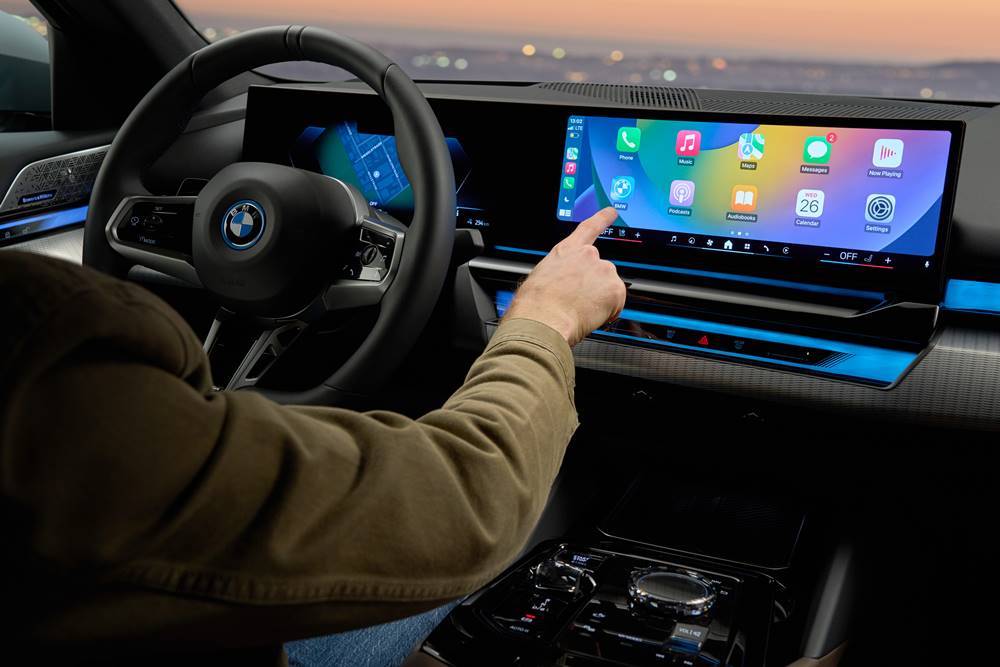
There are many ways to perform this easy pairing task. Many new models have Android Auto and Apple CarPaly, and while most still require USB connections, many now also offer Wireless as well. Some brands have wireless CarPlay, but their Android Auto still needs a USB cable.
Readers have asked about Bluetooth connections, and that is still an option, but CarPlay as CarPlay uses WiFi, they are 2 different protocols.
The systems usually come already activated, ready for connection, but you may also need to ensure CarPlay used turned on both the car’s infotainment menu and the iPhone menu. Try the methods below first.
Video Review: 2023 Mazda CX-5 touring Review – Is the CX-5 worth the money? #gaycarboys
2023 Viofo A119 Mini 2 dashcam unboxing and review
Help Support Gay Car Boys Subscribe to our Youtube Channel
- Top GayCarBoys Stories:
- Sexy Men Drive 2021 Toyota Yaris Cross
- 10 Sexiest MotoGP Motorcycle Riders
- DON’T Drive YOUR CAR until you’ve Checked if your AIRBAG will KILL YOU
- 10 Hottest Racing Drivers
- Top 12 Best Gay Lesbian LGBTI Luxury Cars
- Top 10 Gay Lesbian LGBT Cars
- Top 10 Gay Lesbian LGBT Sports Cars
- Top 15 gay and lesbian LGBT SUVs
- Talented Twinks – Callum Ilott Virtually Races Arthur Leclerc


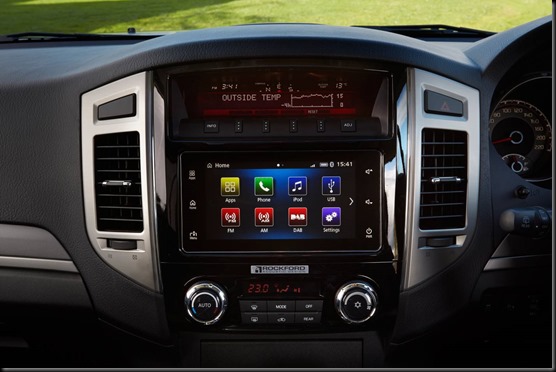


ABOVE: Apple CarPlay
NOTE: SOME CARS will also allow you to unlock your car using your iPhone (as long as the app is installed) See the Apple website HERE
CarPlay using USB:
1: Unlock iPhone, then plug into the USB port (either USB A or USB C) using the iPhone cable. USB outlets may be located in the centre armrest bin, or below the centre screen. Locations vary depending on the vehicle.
TOP TIP: make sure you use the correct USB port, as 1 of the ports might be for charging only.
2: The infotainment system may indicate “READING USB DEVICE”
3: Follow the prompts. Both the phone and car screen may ask the user to perform confirmation processes
4: If asked “Use CarPlay when iPhone locked?” select YES.
You should now be ready to go. Often, the system will switch straight to CarPlay next time the device is plugged in. The user may need to select the CarPlay app if the system doesn’t switch automatically for subsequent car starts.
CarPlay using Wireless:
Start the process as you would if connecting to Bluetooth.
1: Open Bluetooth on iPhone settings.
2: Either enter the vehicle settings menu to find Bluetooth (or try pressing the phone symbol on the steering wheel. This may prompt “connect new device”.)
2: Once in “Connect New Device”, click YES, or the “+” button
3: The system will say something like, “searching for new devices”.
4: When you see your phone appear in the menu, select it. You may also need to select it on the phone Bluetooth menu.
5: Connect to Bluetooth as usual. If you see the CarPlay symbol in the list of features on the vehicle screen select it (although the car may automatically ask if you want to connect via CarPlay).
6: You’ll notice the car is no longer connected by Bluetooth in the list on the phone
7: If asked “Use CarPlay when iPhone locked?” select YES.
We have found some wireless systems to be moody. If the connection is sub-par, try going into the Bluetooth device menu and selecting you phone, then CarPlay again. Once again the phone will switch to WiFi.
Let us know how you go
Other GayCarBoys Stories:
- Suzuki Jimny is Everyone’s Must-Have. Here’s Why.
- Sexy Men Drive 2021 Toyota Yaris Cross
- Top 15 gay and lesbian LGBT SUVs
- Toyota Landcruiser VX: King of the Load
- LandCruiser Sahara: Your limo to the wild awaits.
- 2020 Landrover Defender: New, for the sake of it?
- Landrover Defender In Final Desert Testing
- 2020 Range Rover Evoque P250 R-Dynamic S VIDEO REVIEW
- Land Rover Around The World in 70 Days Challenge
- 11 Best Things about VW Amarok
- Amarok V6 is tops
- Toyota Hilux Rugged X Review and video
- Nissan Navara N Trek Warrior VS Toyota Hilux Rugged X down on the Farm.
- 2019 Toyota Hilux Rugged X Review, Road Test, and video.
- RAM 1500 Laramie VIDEO car review
- 2018 Ram 1500 Road Test and Review
- A Weekend Away in a Jeep Compass with 3 Hot Companions
- Is Jeep Gladiator a Backroom Bar on Wheels?
- 2018 Jeep Compass Limited Review
- 2020 Mitsubishi Pajero Sport Exceed review in the DUNES
- 2020 Mitsubishi Pajero Sport
- 2018 Mitsubishi Pajero Sport GLX Review
Discover more from Gay Car Boys
Subscribe to get the latest posts sent to your email.










Leave a Reply